About Panasonic Lumix Link
“LUMIX LINK” is an application that makes it possible to use your smartphone to remotely control the shooting and playback functions of a LUMIX digital camera equipped with wireless communication functions and perform...
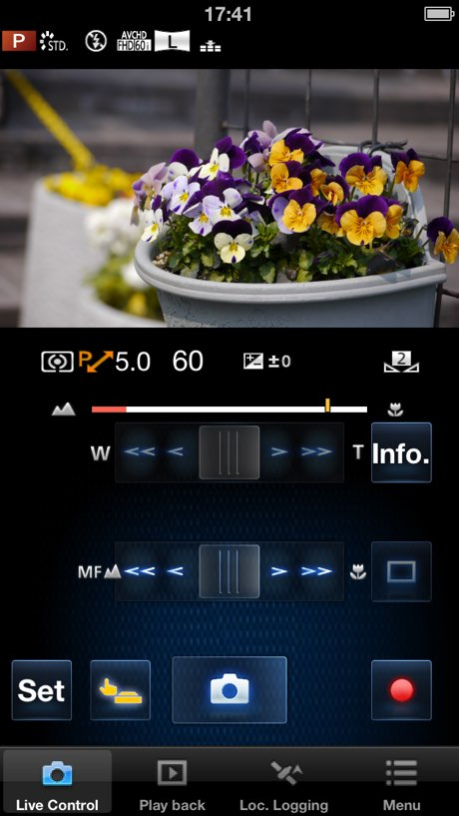
“LUMIX LINK” is an application that makes it possible to use your smartphone to remotely control the shooting and playback functions of a LUMIX digital camera equipped with wireless communication functions and perform upload operations to SNS sites. The following functions are available in this application. (Compatible models are listed in parentheses.) [Features] ・ A function that allows you to see the same image as that on the camera’s Live View screen during shooting (FX90, SZ5, GH3) ・ Functions for transferring recorded pictures from the camera to your smartphone, and for uploading them to SNS sites (FX90, SZ5, GH3) ・ Functions for playing back or deleting recorded pictures in the camera from your smartphone, copying them to your smartphone, and uploading them to SNS sites (SZ5, GH3) ・ A function for recording location data using GPS (SZ5, GH3) ・ A function for adding location data obtained using your smartphone to pictures in the camera (SZ5, GH3) ・ Functions for sending and receiving pictures using the LUMIX CLUB Cloud Sync. Service (SZ5, GH3) [About Recording location data using GPS function] ・ The application is able to record location data using GPS function to send them to the camera (SZ5).The obtained location data is used only for adding location data to the still pictures and videos recorded by the camera (SZ5).After location data is sent to the camera (SZ5), you can delete location data recorded in the application. ・ iPod touch and Wi-Fi versions of iPad without GPS sensor cannot obtain high-accuracy location data. [Notes] ・ Continued use of GPS running can dramatically decrease battery life. ・ In order to use the SNS upload functions and Cloud Sync. Service, you must first obtain a service user ID for Panasonic’s service LUMIX CLUB (free of charge). [Notes on using iOS6] The message “Images cannot be displayed. Enable [Location Services].” may be displayed while starting or operating LUMIX LINK. In that case, perform the following steps to change settings. (1) Launch Settings and tap Privacy. (2) Tap Photos in the Privacy setting. (3) Set LUMIX LINK to ON in the Photos menu. This application is compatible with smartphones with the following OS versions. iOS 4.3 - 6.1
Version History 1920 x 1080, 60p[NTSC]/50p[PAL], 28Mbps mode is added in the video recording option of [MP4]. 2.1.29 03/27/2013 ・ A manual focus function and video recording timer have been added to the Live View screen. Advanced recording settings such as aperture value, shutter speed and exposure compensation can be performed. ・ A function for automatically transmitting pictures recorded on the camera to your smartphone or tablet has been added. 2.1.25 12/03/2012 ---Version2.0.22--- “LUMIX LINK” is an application that makes it possible to use your smartphone to remotely control the shooting and playback functions of a LUMIX digital camera equipped with wireless communication functions and perform upload operations to SNS sites. The following functions are available in this application. (Compatible models are listed in parentheses.) [Features] ・ A function that allows you to see the same image as that on the camera’s Live View screen during shooting (FX90, SZ5) ・ Functions for transferring recorded pictures from the camera to your smartphone, and for uploading them to SNS sites (FX90, SZ5) ・ Functions for playing back or deleting recorded pictures in the camera from your smartphone, copying them to your smartphone, and uploading them to SNS sites (SZ5) ・ Recording location data using GPS function (SZ5) ・ A function for adding location data obtained using your smartphone to pictures in the camera (SZ5) ・ Functions for sending and receiving pictures using the LUMIX CLUB Cloud Sync. Service (SZ5) [About Recording location data using GPS function] ・ The application is able to record location data using GPS function to send them to the camera (SZ5).The obtained location data is used only for adding location data to the still pictures and videos recorded by the camera (SZ5).After location data is sent to the camera (SZ5), you can delete location data recorded in the application. ・ iPod touch and Wi-Fi versions of iPad without GPS sensor cannot obtain high-accuracy location data. [Notes] ・ Continued use of GPS running can dramatically decrease battery life. ・ In order to use the SNS upload functions and Cloud Sync. Service, you must first obtain a service user ID for Panasonic’s service LUMIX CLUB (free of charge). This application is compatible with smartphones with the following OS versions. iOS 4.3 – 5.1 ---Version2.0.25--- Bug fix 2.0.25 08/14/2012 “LUMIX LINK” is an application that makes it possible to use your smartphone to remotely control the shooting and playback functions of a LUMIX digital camera equipped with wireless communication functions and perform upload operations to SNS sites. The following functions are available in this application. (Compatible models are listed in parentheses.) [Features] ・ A function that allows you to see the same image as that on the camera’s Live View screen during shooting (FX90, SZ5) ・ Functions for transferring recorded pictures from the camera to your smartphone, and for uploading them to SNS sites (FX90, SZ5) ・ Functions for playing back or deleting recorded pictures in the camera from your smartphone, copying them to your smartphone, and uploading them to SNS sites (SZ5) ・ Recording location data using GPS function (SZ5) ・ A function for adding location data obtained using your smartphone to pictures in the camera (SZ5) ・ Functions for sending and receiving pictures using the LUMIX CLUB Cloud Sync. Service (SZ5) [About Recording location data using GPS function] ・ The application is able to record location data using GPS function to send them to the camera (SZ5).The obtained location data is used only for adding location data to the still pictures and videos recorded by the camera (SZ5).After location data is sent to the camera (SZ5), you can delete location data recorded in the application. ・ iPod touch and Wi-Fi versions of iPad without GPS sensor cannot obtain high-accuracy location data. [Notes] ・ Continued use of GPS running can dramatically decrease battery life. ・ In order to use the SNS upload functions and Cloud Sync. Service, you must first obtain a service user ID for Panasonic’s service LUMIX CLUB (free of charge). This application is compatible with smartphones with the following OS versions. iOS 4.3 – 5.1 2.0.22 08/01/2012 Bug fix 1.0.8 07/03/2012 Bug fix. 1.0.6 10/30/2011 Bug fix. 1.0.5 09/21/2011 UI improvements. Bug fix. 1.0.4 09/16/2011 1.0.0 08/24/2011
Previous Versions
Here you can find the changelog of Panasonic Lumix Link since it was posted on our website on 2016-09-24 13:18:16.
The latest version is 2.1.29 and it was updated on 2026-10-05 02:51:01. See below the changes in each version.
Panasonic Lumix Link version 2.1.29
Updated At: 2026-07-23
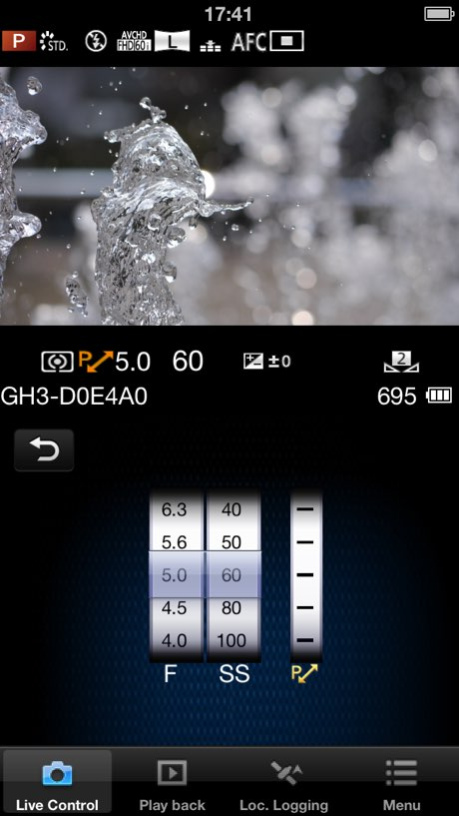
Changes: Version History 1920 x 1080, 60p[NTSC]/50p[PAL], 28Mbps mode is added in the video recording option of [MP4]. 2.1.29 03/27/2013 ・ A manual focus function and video recording timer have been added to the Live View screen. Advanced recording settings such as aperture value, shutter speed and exposure compensation can be performed.
・ A function for automatically transmitting pictures recorded on the camera to your smartphone or tablet has been added. 2.1.25 12/03/2012 ---Version2.0.22---
“LUMIX LINK” is an application that makes it possible to use your smartphone to remotely control the shooting and playback functions of a LUMIX digital camera equipped with wireless communication functions and perform upload operations to SNS sites.
The following functions are available in this application.
(Compatible models are listed in parentheses.)
[Features]
・ A function that allows you to see the same image as that on the camera’s Live View screen during shooting (FX90, SZ5)
・ Functions for transferring recorded pictures from the camera to your smartphone, and for uploading them to SNS sites (FX90, SZ5)
・ Functions for playing back or deleting recorded pictures in the camera from your smartphone, copying them to your smartphone, and uploading them to SNS sites (SZ5)
・ Recording location data using GPS function (SZ5)
・ A function for adding location data obtained using your smartphone to pictures in the camera (SZ5)
・ Functions for sending and receiving pictures using the LUMIX CLUB Cloud Sync. Service (SZ5)
[About Recording location data using GPS function]
・ The application is able to record location data using GPS function to send them to the camera (SZ5).The obtained location data is used only for adding location data to the still pictures and videos recorded by the camera (SZ5).After location data is sent to the camera (SZ5), you can delete location data recorded in the application.
・ iPod touch and Wi-Fi versions of iPad without GPS sensor cannot obtain high-accuracy location data.
[Notes]
・ Continued use of GPS running can dramatically decrease battery life.
・ In order to use the SNS upload functions and Cloud Sync. Service, you must first obtain a service user ID for Panasonic’s service LUMIX CLUB (free of charge).
This application is compatible with smartphones with the following OS versions.
iOS 4.3 – 5.1
---Version2.0.25---
Bug fix 2.0.25 08/14/2012 “LUMIX LINK” is an application that makes it possible to use your smartphone to remotely control the shooting and playback functions of a LUMIX digital camera equipped with wireless communication functions and perform upload operations to SNS sites.
The following functions are available in this application.
(Compatible models are listed in parentheses.)
[Features]
・ A function that allows you to see the same image as that on the camera’s Live View screen during shooting (FX90, SZ5)
・ Functions for transferring recorded pictures from the camera to your smartphone, and for uploading them to SNS sites (FX90, SZ5)
・ Functions for playing back or deleting recorded pictures in the camera from your smartphone, copying them to your smartphone, and uploading them to SNS sites (SZ5)
・ Recording location data using GPS function (SZ5)
・ A function for adding location data obtained using your smartphone to pictures in the camera (SZ5)
・ Functions for sending and receiving pictures using the LUMIX CLUB Cloud Sync. Service (SZ5)
[About Recording location data using GPS function]
・ The application is able to record location data using GPS function to send them to the camera (SZ5).The obtained location data is used only for adding location data to the still pictures and videos recorded by the camera (SZ5).After location data is sent to the camera (SZ5), you can delete location data recorded in the application.
・ iPod touch and Wi-Fi versions of iPad without GPS sensor cannot obtain high-accuracy location data.
[Notes]
・ Continued use of GPS running can dramatically decrease battery life.
・ In order to use the SNS upload functions and Cloud Sync. Service, you must first obtain a service user ID for Panasonic’s service LUMIX CLUB (free of charge).
This application is compatible with smartphones with the following OS versions.
iOS 4.3 – 5.1 2.0.22 08/01/2012 Bug fix 1.0.8 07/03/2012 Bug fix. 1.0.6 10/30/2011 Bug fix. 1.0.5 09/21/2011 UI improvements.
Bug fix. 1.0.4 09/16/2011 1.0.0 08/24/2011
Panasonic Lumix Link version 2.1.29
Updated At: 2020-03-28
Changes: 27 mars 2013 Version 2.1.29
1920 x 1080, 60p[NTSC]/50p[PAL], 28Mbps mode is added in the video recording option of [MP4].
Panasonic Lumix Link version 2.1.29
Updated At: 2013-03-27
Changes: 1920 x 1080, 60p[NTSC]/50p[PAL], 28Mbps mode is added in the video recording option of [MP4].
Panasonic Lumix Link version 2.1.29
Updated At: 2013-03-27
Changes: Mar 27, 2013 Version 2.1.29
1920 x 1080, 60p[NTSC]/50p[PAL], 28Mbps mode is added in the video recording option of [MP4].
Panasonic Lumix Link version 2.1.29
Updated At: 2011-09-02
Panasonic Lumix Link version 2.1.29
Updated At: 1970-01-01
Changes: 27 мар. 2013 г. Version 2.1.29
1920 x 1080, 60p[NTSC]/50p[PAL], 28Mbps mode is added in the video recording option of [MP4].
Panasonic Lumix Link version 2.1.29
Updated At: 1970-01-01
Changes: 2013年3月27日 Version 2.1.29
1920 x 1080, 60p[NTSC]/50p[PAL], 28Mbps mode is added in the video recording option of [MP4].
Disclaimer
Official App Store Link
We do not host Panasonic Lumix Link on our servers. We did not scan it for viruses, adware, spyware or other type of malware. This app is hosted by Apple and passed their terms and conditions to be listed there. We recommend caution when installing it.
The App Store link for Panasonic Lumix Link is provided to you by apps112.com without any warranties, representations or guarantees of any kind, so access it at your own risk.
If you have questions regarding this particular app contact the publisher directly. For questions about the functionalities of apps112.com contact us.